
For TA & employer brand teams

Turn job posts into on-brand recruitment ads in minutes

Recruiters create video job ads and static variants from any job post or vacancy URL. Marketing keeps control over templates, approved assets, and brand consistency.

  • Paste any job post or vacancy URL and generate recruitment ads in your brand template
  • Protect your employer brand with locked templates and approved assets
  • Test different hooks and visuals for the same role on Meta and LinkedIn
Used by recruitment teams who take social visibility seriously
Schedule 15 min demo
jobs.workpartners.co
WorkPartners

AI Product Engineer

WorkPartners | NYC (Hudson Yards HQ + remote)

Impact

Build the AI tools New York's top recruiters trust to fill roles faster.

Your week

• Ship AI features: agents, smart workflows, data-driven analytics.

• Automate manual work with low-code or Python/JS services.

• Connect ATS & career-site APIs into our product.

You

• 3–5 yrs software / data / AI engineering.

• Strong Python or JavaScript; OpenAI API experience.

WorkPartners412 followers · Promoted

Are you our next AI Product Engineer?

Hiring: AI Product Engineer
workpartners.co
Apply Now

Trusted by recruitment marketing teams including

HireDataBlue Wave RecruitmentViePeopleActureODIVEmpleartimetohiretanteLouiseBright PlusLeadrsilionxAvoltaHaldu GroepRENOLITSelection LabProfieldGeoStabilizationAethonInbox StorageHireDataBlue Wave RecruitmentViePeopleActureODIVEmpleartimetohiretanteLouiseBright PlusLeadrsilionxAvoltaHaldu GroepRENOLITSelection LabProfieldGeoStabilizationAethonInbox Storage

What changes

Three reasons recruitment ads take too long to make

Recruitment ad production takes too long, testing is too weak, and resizing eats too much time.

01Too slow

From job URL to export in under 10 minutes

Many teams spend a full day rebuilding ads in Canva for one role, or wait weeks for agency creative. Paste the vacancy and export campaign-ready ads the same day the role goes live.

  • Paste a job URL or vacancy text to start
  • Use your locked template instead of resizing by hand
  • Download MP4s for Meta, LinkedIn, and your ad workflow

Canva or agency

A full day per role, or weeks in a queue

RecruitmentAds.com

Under 10 minutes to first export

123

Paste job URL

Pick template

Export MP4

02Hard to test

Create 3–5 on-brand variants for the same role

Candidates do not all read a vacancy the same way. Some scan requirements first, others perks or what the day-to-day looks like. Test which angle lands with different voice-overs, backgrounds, and people in frame, without rebuilding the ad.

  • Lead with requirements, perks, or the role itself, pulled from the same vacancy
  • Swap voice-over, background, and on-screen people per variant
  • Built for campaign testing, not one-off posts
  • 3+ yrs Python
  • AWS · Docker
  • Team lead exp

Data Engineer

Amsterdam · Full-time

Requirements

€3,800/month30 days offLease car

Data Engineer

Amsterdam · Full-time

Perks

  • Ship product weekly
  • Own the roadmap
  • Small agile team

Data Engineer

Amsterdam · Full-time

The role

03Too many sizes

Video job ads and static versions in every size your channels need

Meta, LinkedIn, Reels, and feeds all want different aspect ratios. Export video and matching static ads from one workflow instead of manual resizing every format.

  • 9:16 for Stories, Reels, and vertical feeds
  • 4:5 and 1:1 for LinkedIn and Meta feed placements
  • Static ad included with each video export for A/B tests

One export workflow

MP4 + static

9:16

Stories & Reels

Video

4:5

Meta feed

Video + static

1:1

LinkedIn feed

Video + static

See how it works

Watch a real job post become finished recruitment ads

A 9-minute demo with a real vacancy, from job post URL to exported recruitment ads.

9-minute walkthrough

Ready to try it on one of your live vacancies?

Book a 15 min demo

Recruitment ads built from real job posts

Recruitment ads are the paid video and static ads that put a job in front of people who never searched for it. Every preview below was built from a real job post, in square, vertical, feed, and landscape formats.
Click any preview to watch with sound.

See 15 real recruitment ad examples

Recruitment videos: examples, how-to, and FAQ

Book a 15 min demo

What customers say

What happened when these teams switched to video job ads

The engagement rate is crazy good.

Read the Dunhill story

Rob Stewart

Rob Stewart

VP @ Dunhill Professional Search & Government Solutions

We went from a basic job description to a compelling, Meta-ready ad creative in minutes. After publishing it ourselves, applications started rolling in within the hour. If you're serious about testing ads quickly and getting immediate results, you need this tool.

Jeroen Sakkers

Jeroen Sakkers

Founder & CEO @ HireData.com

A professional job video within minutes! Good tools for job videos are rare. With this software, you simply enter your job details and instantly get professional creative ready for campaigns. It saves a huge amount of time and delivers material you wouldn't easily create yourself.

Lotte Scheele

Lotte Scheele

Owner Leads Op Maat

Customer story

Dunhill put faces in their job posts without a camera

Dunhill recruits for security-cleared federal IT roles, the kind you do not put on camera. Their recruiters make the recruitment videos themselves and post them to a LinkedIn following of more than 150,000.

+158%LinkedIn post impressions

First seven days, February 2026. Organic, no paid promotion.

Read the Dunhill story →

Paid Meta campaigns

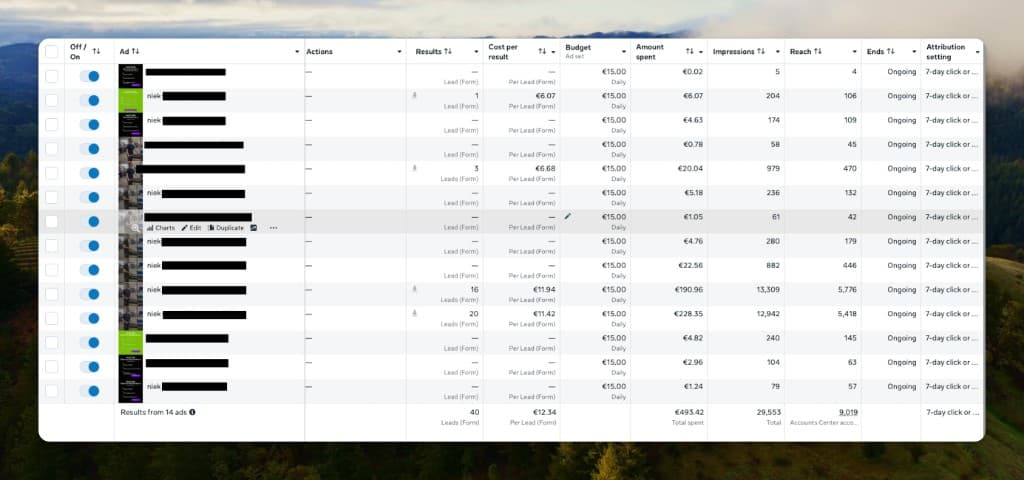
Video took 90% of the leads in Profield's Meta campaigns

Profield, a Dutch recruitment agency, runs statics and RecruitmentAds videos side by side in the same Meta lead campaigns. In this stretch, 36 of the 40 lead-form results came through two of the videos. Both formats stay in the account; the auction decides.

90%of leads came through video

36 of 40 lead-form results, spring 2026. One account, €493 of spend.

More on recruitment video

Profield's Meta Ads Manager at ad level: 14 ads totalling 40 lead-form results at 12.34 euro per lead, with two video ads carrying 16 and 20 leads

Profield's Meta Ads Manager, ad level · 14 ads · ad names redacted

Employer brand teams

We build your recruitment ad template. Marketing stays in control.

RecruitmentAds handles custom recruitment video template setup, approved asset library configuration, and team onboarding. Marketing signs off on motion, brand lock, and guardrails. Recruiters paste vacancies and export video ads.

studio.recruitmentvideo.ai
Branded video templateCustom build

Logo & fonts

locked

Colors

locked

Intro / outro

locked

Voice-over

editable

Role copy

editable

Variants

editable

1

We build your custom video template

Share brand guidelines, example ads, and employer brand rules. We build the motion video template, configure locked vs editable fields, voice-over defaults, asset rules, and export formats. Marketing reviews and signs off.

studio.recruitmentvideo.ai

Approved assets

Team

Office

B-roll

Stock

PhotosClipsAI visualsGuardrails
2

We set up your asset library

Point us to approved photos, clips, stock, or visual rules. We configure the library. Marketing signs off on what recruiters can use.

studio.recruitmentvideo.ai

Pilot rollout

  • Template signed off
  • Asset library loaded
  • 3Pilot vacancies live
3

We onboard your team

Run a pilot on live vacancies with onboarding and training included. Expand once the output looks right.

Recruitment teams

From job post to ready-to-publish recruitment ad in three steps

Paste the job post, create recruitment ad variants, and export files you can publish right away.

studio.recruitmentvideo.ai

Job URL

careers.example.com/data-engineer

Data Engineer

Amsterdam · Full-time

1

Paste your job post

Start from a job URL or pasted job text. Role details flow into your approved template.

studio.recruitmentvideo.ai
RequirementsPerksThe role
2

Create on-brand variants

Try different hooks, visuals, and messages for the same role without rebuilding from scratch.

studio.recruitmentvideo.ai

Export

9:16
4:5
1:1
MP4Static
3

Export to your channels

Download video and static ads in 9:16, 4:5, and 1:1 for Meta, LinkedIn, Reels, and feeds.

Who it's for

Recruitment advertising software built for campaign volume

In-house recruitment

A tiny team, a huge requisition load

You do not have a creative department. When hiring spikes, every vacancy still needs campaign-ready content, and Canva is eating days you do not have.

  • Self-serve workflow recruiters can run today
  • No waiting on marketing or agency for every role
  • On-brand output without design skills
Self-serve workflow recruiters can run today
No waiting on marketing or agency for every role
On-brand output without design skills

Compare your options

So this is essentially Canva for recruitment marketing?

Yes. And a bit more.

Marketing locks the brand, recruiters don't freestyle every ad, and video is built in, not pasted together from screenshots and stock.

Compare
Manual / Canva
Agency
RecruitmentAds.com
Time per vacancy
A whole workday is possibleNo
2–4 weeks typicalNo
Minutes, campaign-readyYes
Brand control
Everyone does their own thingNo
Brief cycles, inconsistent outputNo
Locked templates + approved assetsYes
Variants per role
Painful to redo each versionNo
Expensive per versionNo
Built for multiple versionsYes
Who creates it
Recruiter + CanvaNo
External production teamNo
Recruiters self-serve, marketing governsYes
Cost at volume
Hidden time cost every weekNo
$1,500+ per vacancy adds up fastNo
From ~$2 at volumeYes
Enterprise vacancy volume
Does not scaleNo
Scales, at high costPartial
Self-serve at scaleYes

Getting started

How branded setup works

Choose our branded setup and we build a custom recruitment video template from your brand guidelines: motion design, locked brand elements, approved assets, voice-over defaults, and export formats. Then we refine it from your feedback and onboard your team.

Custom branded template

Motion design, brand lock, and recruiter guardrails in one template.

9:164:51:1

What we configure

Logo & fonts

locked

Colors & layout

locked

Intro & outro

locked

Voice-over

editable

Asset library

locked

Role copy

editable

Variants

editable

Export formats

locked

1

We build your first template

Share brand guidelines, example ads, and any employer brand rules. We design the template, configure locked vs editable fields, and ship the first version within 5 work days.

2

You review, we implement

Marketing gives feedback on layout, assets, and locked fields. We apply the last touches and implementation within 4 work days after that round.

3

45-minute team onboarding

A live session with your whole team: paste a real vacancy, create variants, and export ads everyone can publish the same week.

Human support, fast

Same-day replies from real people, not a bot queue. Our average response time is currently 11 minutes.

Marketing stays in control

Your template ships with locked logo, fonts, colors, layouts, intro/outro, and asset rules. Recruiters edit vacancy copy, variants, and voice-over inside those guardrails.

Then test on live roles

Run the 90-day pilot on real vacancies once the template is signed off. See what your team would actually publish.

Pricing

Plans from $399/month

Video agencies charge $1,500–$5,000+ per video and take weeks. Make the same ads, career content, and social clips yourself, in minutes.One ad set = one approved video ad in every standard format, plus matching statics for Meta and LinkedIn.

  • Credits upfront from day one
  • >93% of teams continue after pilot
  • No training on your data

Every plan starts with a 90-day pilot on live vacancies. Pilot fee counts toward year 1 if you continue.

EU data & privacy

EU-hosted privacy for hiring teams anywhere.

RecruitmentAds.com turns vacancy text and brand assets into recruitment marketing files on EU infrastructure — creative production for paid social, not applicant screening or hiring decisions. IT, legal, and procurement questions are answered upfront. Download the standard trust pack, review policies online, or email [email protected] for a countersigned DPA.

EU-hosted storageDPA template (PDF)Subprocessor list (PDF)No training on your dataRecruitment ad creative only

Trust pack

For procurement, legal, and IT review

22 Jun 2026

Data Processing Agreement

Standard business customer DPA

Legal · 11 pp.

PDF ↓

Excerpt from PDF

2. Roles and scope

  • For Customer Data, the Customer acts as Controller and the Supplier acts as Processor, unless the Customer itself acts as Processor on behalf of a third-party Controller.
  • The Customer determines which vacancy texts, brand assets, images, videos, voice materials, job information or other materials are uploaded to or used in the Services.

3. Processing instructions

  • The Supplier shall process Customer Data only on documented instructions from the Customer, including through the Main Agreement, this DPA, the Services, user settings and feature selections.
  • The Supplier shall not sell Customer Data.
  • The Supplier shall not use Customer Data to train its own AI models.

6. Subprocessors

  • The Customer grants the Supplier general written authorisation to engage Subprocessors for the processing of Customer Data in connection with the Services.
  • The Supplier shall inform the Customer of intended material changes concerning the addition or replacement of Subprocessors by making an updated Subprocessor List available or by providing notice through email, account notification or another reasonable method.

Stored in the EU

Vacancy text, uploaded assets, and finished exports on EU infrastructure: AWS Ireland, Supabase Frankfurt, EU VPS.

Your assets stay yours

Your photos, videos, job posts, and brand assets are used only to create your ads. They are not added to a shared customer training pool.

Recruitment ad creative, not hiring decisions

Vacancy text and brand assets go in; video and static ad files come out. The platform does not screen, rank, or evaluate candidates. You export creatives and run campaigns in the ad workflow you already use.

Consent-safe asset use

Use approved employee media, stock assets, or governed AI visuals. AI-generated people and voice-over are optional per template — many teams run approved-assets-only. Employee photos and clips should follow your existing consent process, covered in the processing overview.

Procurement-ready docs

Standard DPA, subprocessor list, and data & processing overview, downloadable now. Executed with your pilot or subscription agreement.

View documents →

Frequently asked questions

Straight answers before you start.

Run a pilot on one of your live job posts this week

Paste a job URL, create variants, and see what your team could publish, or book 15 minutes to walk through custom video template setup.

Schedule 15 min demo