Recruitment videos from any job post, powered by AI
Recruitment video AI turns a vacancy URL into hiring videos and video job ads: AI-built scenes from the job description, employee photos, AI voice-over, and formats for Meta and LinkedIn.
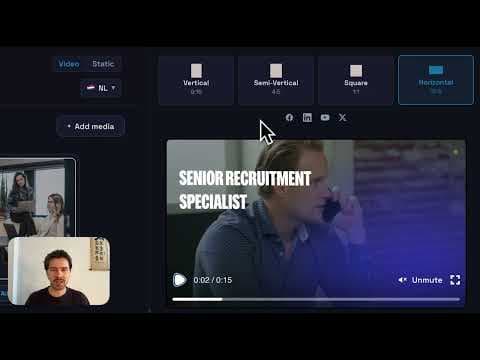
Paste any job URL and get a recruitment video in your brand template
Choose AI visuals, employee photos, or approved assets only
Export square, vertical, feed, and landscape for Meta and LinkedIn
Used by recruitment teams who ship video for every vacancy
2,437+ recruitment ads exported
Recruitment Video
Recruitment videos from any job post, powered by AI
Recruitment video AI turns a vacancy URL into hiring videos and video job ads: AI-built scenes from the job description, employee photos, AI voice-over, and formats for Meta and LinkedIn.
Paste any job URL and get a recruitment video in your brand template
Choose AI visuals, employee photos, or approved assets only
Export square, vertical, feed, and landscape for Meta and LinkedIn
Used by recruitment teams who ship video for every vacancy
2,437+ recruitment ads exported
Trusted by recruitment marketing teams including
What is a recruitment video?
Short video that shows candidates why they should apply
A recruitment video, also called video recruitment creative or a company recruitment video, goes beyond a text job post. It shows the role, team, culture, or apply path in a format candidates expect on LinkedIn, Instagram, TikTok, and paid social feeds.
Recruitment video AI
Software that makes recruitment videos from a job URL
Recruitment video AI reads a job posting and exports a finished hiring video or video job ad: script, visuals, voice-over, and MP4s for feeds. Choose AI-generated scenes from the job description, employee-photo layouts, or approved assets only. Then iterate without booking recruitment video production for every role.
Recruitment video maker
Recruitment video software for job ads, not video interviews
Looking for a recruitment video maker or recruitment video software? This is for teams that need scroll-stopping job ad video, not AI video interview platforms like HireVue.
Paste a job URL and get square, vertical, feed, and landscape exports from a locked recruitment video template
Automated video recruitment from the job post: script, visuals, and voice-over without a production crew
Minutes per role vs weeks with a recruitment video agency or corporate video recruitment shoot
Two different products answer to this name. One makes advertising: a video for a vacancy, exported for the feeds you will run it in. The other records candidates answering questions. This is the first kind. If you came here for the second kind, the table below says so plainly and you can stop reading.
That confusion is not the reader's fault. Search for video recruitment software and every result on the first page is interviewing software, and the questions Google attaches to it are about interview platforms and their pricing. Search for a recruitment video maker instead and you get a different world: general video editors with a recruitment landing page, a stock library and a template gallery. Neither result set mentions the other exists.
So here is what the ad-making kind actually does, what came out of ours, what to ask any tool in this category including this one, and the five things it does not do. Nothing below is scored, because a score is an opinion about your hiring and we do not have one.
Niels Geominy·Founder, RecruitmentAds.com··
What a recruitment video maker does with a job post
The useful question about any tool in this category is what you have to type in before it makes anything. If the answer is an empty canvas and a stock library, the tool has not removed the work, it has moved it into a browser. Here the input is the vacancy you already wrote.
1
Paste the vacancy.
A job URL or the job text. The role title, the location, the pay if it is published, the requirements and the apply path are read out of it. Nothing is retyped, which is also why the ad cannot quietly disagree with the posting it is advertising.
2
Pick how it looks and who is in it.
Three routes, and they are a policy decision more than a creative one: scenes generated from the job description with no photos required, your own approved employee photography placed into brand layouts, or approved assets only with no generated people at all. Marketing locks which of the three a recruiter is allowed to use.
3
Let it write and voice the script.
The narration comes out of the requirements, the perks and the apply path, so it is specific to the role rather than to your industry. Change the hook and it regenerates, which is the part that makes a second version cheap enough to bother making.
4
Export every ratio at once.
One source, four aspect ratios: 9:16, 4:5, 1:1, 16:9. Not one master cropped four ways, which is how a call to action ends up sitting under a platform's own buttons.
The whole loop is minutes, and it is the same number of minutes on the fiftieth vacancy as on the first. That is the only claim in this section that matters commercially, and it is also the one you should make us prove on one of your own live roles rather than take on trust.
Eight recruitment videos this made, and their measured specs
Template galleries show what a tool could produce in ideal conditions. This is what came out of ours for real employers, on real roles, and you can watch all of them. Each one is shown inside the platform chrome it ran in, so you are judging the ad the way a candidate met it rather than as a bare video on a white page.
Every dimension and duration below was measured with ffprobe from the published file, not taken from a format label or a filename. All 8 are 30fps.
Employer
Placement
Ratio
Measured pixels
Seconds
Randstad
Instagram feed
4:5
1080 x 1350
7.72
Grant Thornton
Facebook feed
4:5
1080 x 1350
12.05
Dunhill Professional Search & Government Solutions
LinkedIn feed
1:1
1080 x 1080
14.04
Ilionx
Instagram Stories
9:16
1080 x 1920
7.72
Profield
Instagram feed
9:16
1080 x 1920
8.04
Haldu Groep
YouTube
16:9
1920 x 1080
14.04
Kremer
LinkedIn feed
1:1
1080 x 1080
13.08
Vytech
TikTok in-feed
9:16
1080 x 1920
7.38
Swipe the table sideways for the rest of the columns.
Two things in that table are worth arguing with. The durations run from seven seconds to fourteen, and the long end is long: a fourteen-second feed ad is asking for a lot of patience from a thumb that has not decided anything yet. And four different ratios came out of the same workflow, which is the point, but it also means four different crops of the same idea, and the vertical one is always the one that has to work hardest.
All eight are taken apart in full on our recruitment ad examples page, with the hook, why each works, and what we would change about our own.
One of them has a whole build behind it: the Dunhill campaign, including how the role, the clearance and the salary got on screen.
None of the eight carries a performance number here, because we do not have result data we can source for them. Where you see engagement percentages next to recruitment creative, ask who measured it and against what.
Video recruitment software: one search, two different products
The phrase is genuinely ambiguous and both industries have a fair claim on it. Here is the split, so you can tell in about ten seconds which half of it you were looking for.
The question
Making ads (this)
Interviewing candidates
What does it produce?
Advertising creative. A video or image ad for a specific vacancy, exported in the ratios a feed accepts.
A recording of a candidate. Either answers to set questions, recorded alone, or a live call that is captured.
Who is in front of the camera?
Your employer brand: colleagues, workplaces, or generated scenes you approve.
The applicant.
Where in hiring does it sit?
Before anyone applies. It is how the vacancy reaches people who were not searching.
After they apply. It is a screening step between the application and the shortlist.
Who buys it?
Employer brand, recruitment marketing, and the agencies and RPOs who run campaigns for them.
Talent acquisition operations, usually alongside or inside an applicant tracking system.
Swipe the table sideways for the rest of the columns.
If the right-hand column is what you came for, the buyer guides that rank on this search cover it properly and some of them are genuinely good: they name their own conflicts of interest, they carry drawbacks sections, and they were updated this year. Go and read those instead. Nothing further down this page will help you.
If it is the left-hand column, the rest of this section is the evaluation. Some teams need both, bought separately, from different vendors, at different points in the process.
What the platforms publish, and where they publish nothing
Every tool in this category promises output that is ready for social. Almost none of them says what that means. Six placements below, with each platform's own figure: 3 of the 6 publish a safe zone, and the other 3 publish nothing at all, in any unit.
Swipe the table sideways for the rest of the columns.
Platform figures read 5 August 2026
The absences matter more than the figures. On LinkedIn and TikTok there is no published number to design against, so the only way to know whether your apply line survives the interface is to put the real creative into the real placement and look at it. On the three that do publish, the numbers are design recommendations rather than technical requirements, which means an ad that ignores them will still upload and will simply perform worse.
The free ad mockup tool renders these placements around your own file with the documented safe zones drawn on, and each platform page carries the full spec with the source and the date it was read.
Six questions to ask any recruitment video tool
These separate tools built for recruitment from general video editors with a recruitment landing page. Ask them of us too. If our answer to any of them is worse than someone else's, that is useful information and you should act on it.
01What do you have to type in before it makes anything?
Why it matters
This is the difference between a video tool and a recruitment tool. If the starting point is an empty template and a stock library, every vacancy costs the same effort as the first one, and the tool has not removed the work, only moved it into a browser.
What a straight answer sounds like
A vacancy URL, or the job text pasted in, with the role, location, pay and requirements read out of it automatically. If the answer is a blank canvas, price the tool as an editor and staff it accordingly.
02Can you see something it made for an employer who is not the vendor?
Why it matters
Template galleries show what the tool could produce in ideal conditions. Real output shows what it produces on a Tuesday, with a real brand, a real role and a real deadline.
What a straight answer sounds like
Finished ads for named employers that you can watch, ideally in the placement they ran in. A wall of customer logos is not the same thing: it proves someone bought the tool, not that the tool made an ad worth running.
03Which aspect ratios come out of one export, and in what resolution?
Why it matters
A single 16:9 file is not a campaign. Vertical, square and 4:5 are separate placements with separate crops, and re-cropping one master is where a call to action ends up under a platform's own buttons.
What a straight answer sounds like
Named ratios with named pixel dimensions, produced from the same source without re-editing. If the tool cannot state its own output resolution, it does not know it.
04What does it know about the platforms it exports for?
Why it matters
Instagram, Facebook and YouTube publish safe-zone figures. LinkedIn and TikTok publish none. A tool that says nothing about either fact leaves you to discover it after the media is bought.
What a straight answer sounds like
Specific figures with the platform named, and honesty about the placements where no figure exists and previewing is the only option.
05Who controls what the brand is allowed to look like?
Why it matters
The moment more than two people make ads, the question stops being creative and becomes governance. Most tools give every user the full editor, which means every user can produce something off-brand at speed.
What a straight answer sounds like
Locked templates, with a named person deciding what a recruiter can and cannot change, and a policy that covers whether generated people are permitted at all.
06What happens on the second, tenth and fiftieth vacancy?
Why it matters
Volume is where recruitment video usually fails. The first video gets made because someone cared about it. The fiftieth gets made only if the process survives without them.
What a straight answer sounds like
A per-role cost and a per-role time that do not rise with the count, and variants per vacancy rather than one film reused until it is invisible.
There is no scoring here and no ranked list, on purpose. We sell one of the tools in this category, which disqualifies us from ranking the others, and the two review sites that do rank them are paid by the vendors they list.
Where we do name competitors, it is one at a time and with the sourcing shown: every vendor comparison lives on the alternatives pages.
What this does not do
Five things, stated here rather than discovered in week three. If any of them is a dealbreaker, better to find that out now than after a procurement cycle.
It does not shoot original footage.
There is no crew and no camera. Visuals are generated, or they are photography you already own and have cleared. If the whole point of the video is a specific person telling a specific story in a specific building, book a shoot. A brand film and a vacancy ad are different jobs, and this tool does the second one.
It does not interview anyone.
No one-way interviews, no live interview rooms, no recording or scoring of candidates, no ranking of applicants. If that is what you need, it is the other category in the table above and we do not compete there.
It does not buy or place your media.
The exports are files. Loading them into Meta, LinkedIn, TikTok or a job distribution platform, setting the audiences and paying for the impressions is still your campaign to run. We make the creative that goes into it, and nothing about the auction that follows.
It cannot make a thin job post interesting.
The ad is built from the posting. A vacancy with no pay, no location detail and four paragraphs of boilerplate produces a video that says nothing, faster than before. Fix the posting first: our free job ad template exists for exactly that, and it is the cheapest improvement available to most hiring teams.
It does not decide your policy on generated people.
Whether synthetic faces may appear in your employer brand is a decision for marketing and legal, not for a tool. We give you the switch and the approved-assets-only mode; we do not give you the answer. If you are going to use real colleagues instead, get the consent in writing, and there is a release form on the site you can take.
Questions about recruitment video software
Sources for this section
Meta: Meta Ads Guide, Instagram ReelsRead 5 August 2026. Instagram Reels aspect ratio, resolution and the three safe-zone percentages. Meta classifies all of them as a design recommendation, not a technical requirement.
Meta: Meta Ads Guide, Facebook Stories and Facebook FeedRead 5 August 2026. Facebook Stories top and bottom safe zones, and the recommended 4:5 feed ratio. Two different published readings of the Stories bottom band exist; the child page shows both.
Google: Google Ads help, video ad specificationsRead 5 August 2026. YouTube vertical safe-zone pixel figures and the recommended resolution. Google publishes the horizontal safe zone as a stepped shape without releasing its values.
Try it on a vacancy you are actually struggling to fill
Demos on a made-up role prove nothing. Bring one that has been open too long, and we will run it through in the call: the job post goes in, the ad set comes out, and you can tell us on the spot whether you would run it. If the answer is no, that is a more useful fifteen minutes than a slide deck.
Plans and what each one includes are published, with no call required to see a number. See pricing
Recruitment video examples
Real recruitment videos from job posts
On-brand recruitment video examples (square, vertical, feed, and landscape) built from real vacancies with AI visuals and voice-over. Click any preview to watch with sound.
On-brand recruitment video examples (square, vertical, feed, and landscape) built from real vacancies with AI visuals and voice-over. Click any preview to watch with sound.
Strong recruitment videos follow a simple structure. Our templates pull these elements from your job URL automatically.
Hook or role title in the first seconds: what the job is and who it is for
Why the role matters: team, mission, or impact candidates care about
Requirements or perks surfaced from the posting: salary, benefits, or must-haves
Clear apply path: where to click, scan, or message next
Feed-ready formats: 9:16 vertical, 4:5 feed, and 1:1 square from one export
AI visuals
Three ways to generate recruitment video visuals
Different roles and brand policies need different AI paths. Marketing can lock which modes recruiters may use per template.
Fully AI-generated from the job description
No photos required. AI builds background scenes and motion from the vacancy (role, location, and audience) so you can ship a hiring video the same day a requisition opens.
Audience-aware visuals inferred from job text
Useful when you have no footage for every role or region
Optional: disable on templates where synthetic people are not allowed
Real employee photos, AI-enhanced
Upload approved team or office photography. AI places real people in on-brand layouts, adjusts backgrounds, or creates motion from stills, all without booking a shoot per vacancy.
Keep authentic faces when employer brand requires it
Reuse one office photo with different on-screen talent per ad variant
Follow your existing consent process for employee media
Approved assets only: no AI people
Slideshow-style recruitment videos from logos, brand colours, stock, and clips you already approved. AI still writes the script and voice-over; visuals stay entirely under marketing control.
Common for enterprises with strict AI or portrait-rights policies
Combine with locked templates so recruiters cannot pull random stock
Fast path when legal prefers no synthetic or transformed people
AI voice-over
AI voice for recruitment videos
Add professional voice-over without recording every script yourself. Pick a voice that fits the role and brand, edit the narration pulled from the vacancy, and regenerate when copy changes.
Narration generated from job requirements, perks, and apply path
Swap hook or emphasis without re-recording in a studio
Works with all three visual modes above
Languages
Recruitment videos in any language from one job post
One job URL can become versions in any language (translated on-screen text and AI voice-over) without a second round of recruitment video production.
All languages supported for text and AI voice-over
Same locked template and brand rules across locales
Localised video job ads on Meta and LinkedIn when you hire in multiple markets
Multi-location employer
Headquarters in one city, engineering in another. English export today, Spanish or French when the same role opens in other regions.
Staffing agency, one client role
Client brief in English; export localised recruitment video ads for each market the role is posted in, without a new edit in Canva per city.
High-volume hiring
Feed-driven vacancies where each requisition needs a fresh recruit video the same day it goes live on the job board.
Lead with salary, requirements, or culture, all pulled from the same vacancy
Test AI-generated scenes vs employee-photo layouts on the same role
Export video and static sets for A/B tests on Meta and LinkedIn
Testing
Multiple recruitment video variants per vacancy
Candidates respond to different hooks. Generate several on-brand versions from the same job post (different openings, visuals, or voice tone) and test which recruitment video wins in the feed.
How to
How to make a recruitment video in three steps
Paste a job URL, choose visuals and voice, export hiring videos and video job ads for social.
1
Paste the job post
Job URL or text. AI extracts title, requirements, perks, logo, fonts, and brand colours into your recruitment video template.
2
Choose visuals and AI voice-over
Pick job-description visuals, employee photos, or approved assets only. Preview your recruitment video before export.
3
Export and publish
Download MP4s and statics for Meta, LinkedIn, Reels, or career sites: organic hiring videos, recruitment reels, or paid video job ads.
Proof
Built for teams that ship recruitment videos weekly
2,437+ recruitment ads exported by hiring teams
See customer stories and CPL benchmarks on our main platform page.
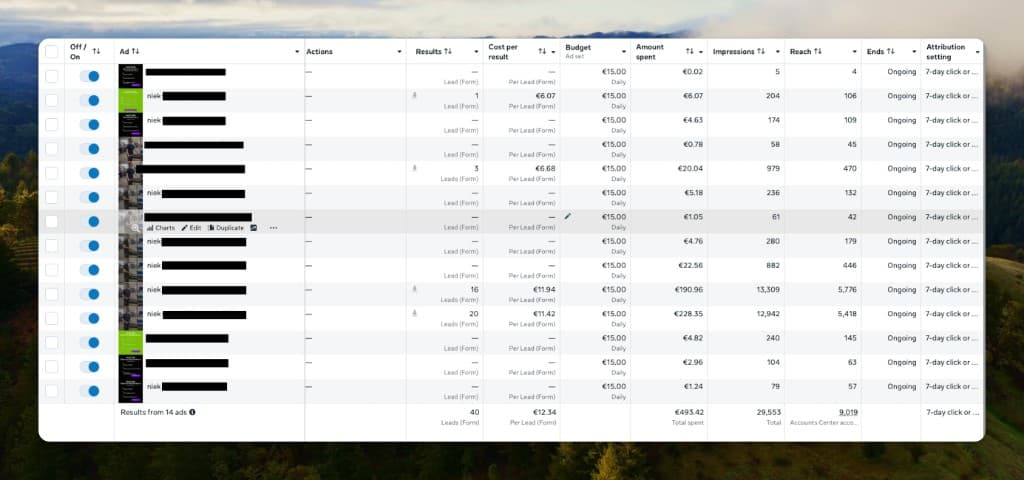
Video took 90% of the leads in Profield's Meta campaigns
Profield, a Dutch recruitment agency, runs statics and RecruitmentAds videos side by side in the same Meta lead campaigns. In this stretch, 36 of the 40 lead-form results came through two of the videos. Both formats stay in the account; the auction decides.
90%of leads came through video
36 of 40 lead-form results, spring 2026. One account, €493 of spend.
Profield's Meta Ads Manager, ad level · 14 ads · ad names redacted
Distribution
Hiring videos, recruitment reels, and video job ads
One recruitment video export covers organic posts, recruitment video marketing on paid social, and outreach, with no separate tools for each format.
Hiring videos & recruitment reels
LinkedIn, Instagram, and TikTok from the same export. Short recruit-video cuts for feeds. No separate editor per role.
Video job ads & recruitment video ads
9:16, 4:5, and 1:1 for Meta and LinkedIn Campaign Manager. Static variants included for video-vs-image tests.
Recruitment video outreach & career sites
Job site video creation: embed on vacancy pages, send in recruiter outreach, or pair with recruitment video marketing campaigns. Same MP4 set everywhere.
Which of those placements is worth paying for, and what to post between campaigns, is set out in our social media recruiting guide, with the reach data behind each channel.
The square and 4:5 cuts are easiest to judge beside real LinkedIn job ad examples, shown inside the feed frame with the specs that produced them.
Compare
Recruitment video AI vs production vs agency vs DIY
Where AI beats traditional recruitment video production, and where templates still protect brand.
Three walkthroughs that go further than this page: the production route with no tool involved, the scripts to start from, and the brand film that is a different job.